Hi!
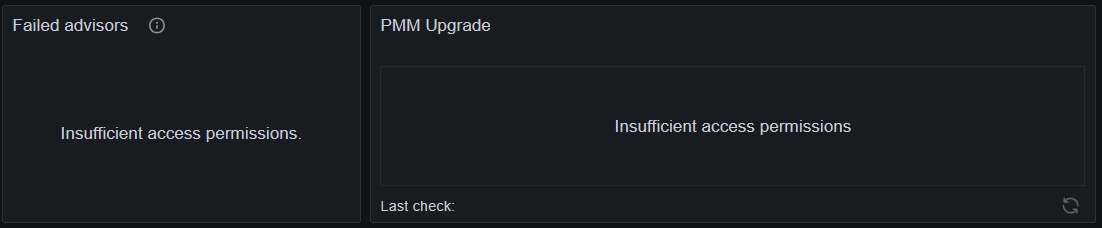
PMM was automatically updated to version 3.5.0. After the upgrade, the dashboard was not accessible — we only saw the “Upgrade in progress” screen. After restarting, the dashboard became accessible again, but both Failed Advisors and the Upgrade Panel show the message “Insufficient access permissions” (logged in as admin).
Additionally, the update page (/pmm-ui/updates) is not accessible. Instead, we receive a 500 error with the following server response:
{“error”: “Internal server error.”, “code”: 13, “message”: “Internal server error.”, “details”: {}}
In the dashboard, the DevTools show the following errors:
Response from /v1/platform/server and /v1/platform/user:
{ “error”: “unknown service platform.v1.PlatformService”, “code”: 12, “message”: “unknown service platform.v1.PlatformService”, “details”: {} }
Response from /v1/server/settings:
{ “error”: “Internal server error.”, “code”: 13, “message”: “Internal server error.”, “details”: {} }
The updates page did work right after the 3.5.0 update, before updating the clients.
Is this a known issue, and is there any fix available?
Yeah this is weird, is the server logs accessible (either from the UI or from /srv/logs)? And is there anything in there that might help?
I found this error in the log (docker exec -it pmm-server cat /srv/logs/pmm-managed.log | tail -100), cut to essentials:
level=error msg="RPC /server.v1.ServerService/GetSettings panic: runtime error: index out of range [0] with length 0
github.com/percona/pmm/managed/services/server.(*Server).getInternalPgQANAgent server.go:756
github.com/percona/pmm/managed/services/server.(*Server).GetSettings server.go:533
Also, under Nodes the pmm-server shows “No clients”. I remember there were always a client listed here before. Is this expected or related to the issue?
Yeah, pmm-server not having any service attached to it is likely related to your issue.
Can you confirm that the pmm-agent is connected to the pmm server? e.g with pmm-admin status. Also can you help review pmm-agent logs too (in /srv/logs).
pmm-admin status output: Agent ID :
Agent ID : pmm-server
Node ID  : pmm-server
Node name: pmm-server
PMM Server:
        URL    : https://127.0.0.1:8443/
        Version: 3.5.0
PMM Client:
        Connected        : true
        Time drift       : 39.174µs
        Latency          : 193.893µs
        Connection uptime: 100
        pmm-admin version: 3.5.0
        pmm-agent version: 3.5.0
Agents:
        d331c1ec-f698-48xx2-b6b1-9xd19779cc89 node_exporter                  Running        42000
and /srv/logs doesn’t contain anything that could be relevant.
Hi, sorry about this - for the panic, it was a case we didn’t handle correctly and the fix is merged/slated for the next release - though it’s still weird that it renders advisors and updates page inaccessible.
Hi @Marvin_Stelter btw are you able to share how the upgrade was performed?
Automatically, I only saw the notification in the morning that an upgrade was currently taking place.But the notification didn’t go away, the process probably got stuck. I then restarted the container, at that point everything was still working, only a day later did the errors mentioned above occur.
Error has been fixed with the 3.6.0 update, thanks!